
MASTERMATIC
Apply master pages based on paragraph and object styles
Note: Since InDesign 2022, “master pages” are called “parent pages”. Mastermatic has not yet been updated to reflect the new terminology, but remains 100% fully functional on all latest versions of InDesign on both Windows and Mac computers.
This InDesign add-on lets you link up master pages to paragraph styles and object styles.
With Mastermatic you can make a list of instructions to tell InDesign:
- Wherever paragraph style A appears in the document, apply master page X
- Wherever paragraph style B appears in the document, apply master page Y
- … and so on.
You can do the same with object styles:
- Wherever object style A appears in the document, apply master page X
- Wherever object style B appears in the document, apply master page Y
- etc. etc.

For example, you can now easily have a special master page applied on every page that contains a graphic image, and a different master page applied to every page that has a “Chapter Title” paragraph style, and so on.
But the best part of it is that it will update automatically while you work!
Unlike a traditional InDesign script, this script can keep track of your document while you work and update the master pages as needed – automatically! So if your text reflows, or you move a graphic to a different page, the appropriate master page will be applied automatically while you continue to work. It’s truly MASTERMATIC!
You’re in good company!
Major world publishers, including Penguin Random House, have rolled out Mastermatic to large teams of their designers. The response? “Overwhelmingly positive!” says John Tomaselli, senior manager. “The designers using it have all acknowledged substantial time savings. [Mastermatic] has become an important tool for us, [and] is highly recommended.”
Main Features
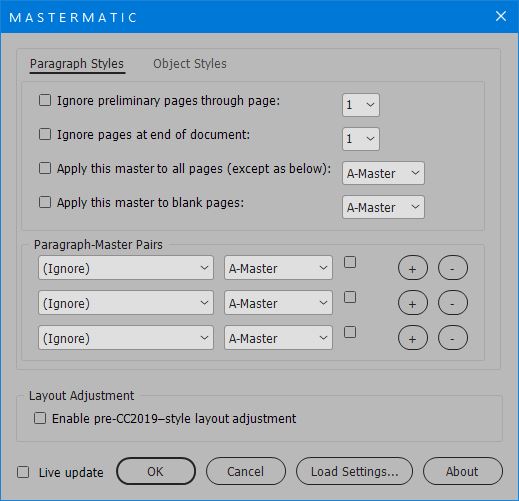
- Create as many paragraph style–master page pairs as you need.
- Create as many object style–master page pairs as you need.
- “Live Update” – InDesign will continuously monitor your document, and apply the correct master pages as needed.
- Choose a default master page for all other pages.
- Choose a master page to apply to all blank pages.
- Ignore the first X number of pages at the start of the document (often, preliminary pages have a specific set of master pages applied whose order never changes).
- “Sticky masters” lets you easily create a document with colored sections.
- All your settings are stored in the document, so you do not need to set them up more than once.
- New in Version 2.2: Load the settings from an old document so you don’t need to create them from scratch each time.
- New in Version 2.5: Enable the old-style InDesign layout adjustment feature. When you apply a new master page with different margins, the text frame will resize accordingly.
User Guide
To browse the full product documentation, click here.
Demo Download
Click here to download a demo of the latest version of Mastermatic. You may run the demo version up to 10 times.
Instant Download
To purchase the full version of Mastermatic for only $57, click the “Buy Now” button. Your product and serial numbers will be available for instant download when you complete the purchase.
Money-back Guarantee
If you are not satisfied with Mastermatic for any reason, simply let us know within 30 days of purchase for a full refund.
Neil
April 4, 2016 9:48 pmGreat script but can how does it keep track of different setting for a single publication without a save setting option?
Admin
April 4, 2016 10:06 pmHi Neil,
Mastermatic saves all the user settings as part of the document metadata (accessible only to scripts) — so you can have different settings for different documents, and when you open each document and run Mastermatic, it will remember the last settings you’ve used for that document.
And if you save a document as a template, then any new documents based off that template will also have those Mastermatic settings set up and ready to use.
With the latest version (2.2.0, May 2019) you can also transfer settings from one document to another unrelated document.
Thanks,
Ariel
(Reply edited in May 2019 to account for the latest updates to Mastermatic.)
Neil
April 7, 2016 3:21 pmMany thanks Ariel for your explanation.
Michael
April 25, 2016 8:19 amGreat script. I believe it tries to replicate what FrameMaker was doing for years with its Reference Pages. There is one thing one can’t expect your script to do right though – to override body page text frames with master page ones and expect to maintain the text flow (something FrameMaker was doing with ease). You are up against text flows and FrameMaker’s ability to differentiate between them. Now that would require some serious thought.
I have something on the pipeline for that.
Michael
Admin
April 25, 2016 10:25 amHi Michael,
Actually, InDesign does allow to differentiate between different text flows using InDesign’s “primary text frame” feature (IIRC this was introducted in CS6). If a frame is marked as a “primary frame” on several master pages, text will always flow into it when that master is applied.
So Mastermatic as it stands now is able to do this.
Michael
April 25, 2016 8:49 pmHm, didn’t know that. I guess I’ll need to upgrade.
Michael
John
August 31, 2016 5:36 pmWhat happens if you pass a document off to someone who does not have this plugin? Do the master pages that were applied with the plugin stay applied when passed off to someone who does not have the plugin?
Admin
August 31, 2016 5:48 pmHi John,
Sure — Mastermatic simply applies the master pages to the document in the regular way. There is no problem at all for someone else without Mastermatic to open the document.
Maarten
November 1, 2016 12:52 pmIf I have a pair of master pages that differ for left and right side, and on both pages the same paragraph style will be applied.
How can mastermagic know which of the two masterpages (left or right) have to be applied?
Clear? If not I can upload a document (or screenshot) with the situation.
Thx.
Admin
November 1, 2016 1:58 pmHi Maarten,
Mastermatic cannot (yet!) do what you ask. It links masters to pages based on paragraph styles and object styles, and doesn’t currently have a feature to links masters based on page side (verso or recto).
However, if your document is set up as 2-page spreads, then presumably the master pages are also set up as facing spreads, and that way you automatically have control on what appears on the left and right sides, no?
Morgan
November 22, 2017 11:29 pmAny update on getting this feature? I have a book layout that adds a background to the page, connected to a paragraph style. But since it’s set to “begin on next page” it can either happen on a recto or verso page. So, if I put the background on both sides of the master, it will override the next Chapter heading page and add the background to both pages. Would love to have this feature!
Ariel
November 23, 2017 12:22 amHi Morgan,
I don’t quite understand what you’re saying.
It sounds like you’ve got 2 paragraph styles: the one that gets the background, and the Chapter Heading style.
Why can’t you just set Mastermatic to apply Master X to the one paragraph style, and Master Y to the other paragraph style?
Morgan
May 7, 2018 10:15 pmI’ll have to try that for a subsequent project. Thanks! Also, do you know if there’s a way around a page-break character being interpreted as a text character? I’m trying to apply blank pages and Mastermatic thinks there is text on the page, but it’s only a non-printing break character.
Ariel
May 7, 2018 11:30 pmNo, there’s no way around that currently.
Rather than insert an actual character, though, it is normally better to set the paragraph itself to start on the next page – this is a setting you can apply either as an override or as part of the paragraph style settings (part of the Keep options).
If you did it that way, Mastermatic would be able to keep the previous page blank.
Tyler
May 31, 2018 5:37 pmQuick question, is there any way to troubleshoot error codes? I’m getting “ReferenceError: Object is invalid Line: 38 The script will now quit.” The script has worked great on other documents but this one particular document seems to cause this error. Any ideas?
Tyler
May 31, 2018 6:45 pmI figured it out. It seemed to be an issue with Endnotes. Apparently it doesn’t like it when one of the “Paragraph-Master Pairs” is associated with an Endnote header. I created a new paragraph style for my Endnote header and everything is good.
Ariel
May 31, 2018 6:54 pmHi Tyler,
Thanks for reporting this. I actually have an update ready (Note: This has now been released) that specifically fixes the endnotes issue — haven’t gotten round to releasing it, but hope to in the next day or two.
Thanks,
Ariel
Kayvon Sadrabadi
February 19, 2019 11:13 pmGreat product. I have a 1500 page document which I use datamerge to get information into indesign from Excel. I have about 33 different master pages to be applied throughout the 1500 pages. is there anyway I can import the paragraph or object style for each page while data merging from Excel? otherwise, I’ll have to go find each one and apply the correct paragraph style/master page to it. any thoughts would be much appreciated. thank you.
Ariel
February 21, 2019 1:27 amHi Kayvon,
It may well be possible to do this in an efficient manner, but I would probably need to see the document in question first to come up with the best solution.
Thanks,
Ariel
SueC
October 18, 2019 1:00 amIs the 2.2.5 version of Mastermatic compatible with the 2018 version of InDesign (build 13.1.1)?
If so, if I have 2.0.1 is this a full price purchase, or is there a discount for previous purchasers? My 2.0.1 activation code doesn’t work with 2.2.5 so I guess I need a new one. I need to make sure it’s compatible before I purchase again—as I have no plan to go InD 2019 for now. (Old Mac.)
Ariel
November 24, 2019 9:52 pmHi Sue,
Sorry about the delayed reply, for some reason I only now saw the comment.
Mastermatic is fully compatible with all the latest versions of InDesign, including (at the time of writing) 2020.
There is no reason your older version 2.0.1 should actually stop working or not activate in 2018. So that isn’t the problem, and if you’re not managing to activate, please get in touch by email and we’ll try to sort out what’s going on there.
Nevertheless, there 2.0.1 is an older version, and the latest version now works properly with the new InDesign endnotes, as well as including a workaround for the missing Layout Adjustment from InDesign 2019 onwards (though if you’re still on 2018 you’re okay as far as that goes).
If you do wish to upgrade to the latest version it costs only $29, and a link to do so is here: https://www.id-extras.com/shopping-cart/?wp_eStore_add_to_cart=54
Thanks,
Ariel
Dan
August 2, 2020 5:26 pmCan the script be deployed with an InDesign Book file (indb), with 400+ pages in separate files?
I’d like the first 2 pages of each file/chapter to be identical, starting on the recto page, which sometimes requires a blank page or two to be added beforehand so it starts on the recto with a blank page on the verso.
Ariel
August 3, 2020 6:22 pmHi Dan,
At this point, Mastermatic only works on a single document. If you’ve got a bunch of documents as part of a book, you would need to run it separately on each doc.
Ariel
Dr Digby L. James
February 11, 2021 2:15 amI’ve upgraded to InDesign 2021 and replaced my internal 512GB SSD with a 2TB SSD. When I run Mastermatic I get the message that “This serial number has already been activated”. What should I do to get it working again?
Ariel
April 28, 2021 2:06 amChanging an internal harddrive would not affect Id-Extras activation. Your Id-Extras serial number is linked to your Adobe account, not to any particular hardware.
T
November 17, 2021 7:03 pmHi Ariel,
Will you in the future be able to set master pages based on sections? Also, would be great to have a “save current master-page set up” when needed alternating master page designs depending on exporting needs?
e.g. master pages for an entire catalog export vs. individual pages.
Thanks!
Ariel
November 19, 2021 4:02 amHi T,
I’m not quite sure how one would connect a master page to a specific section. Sections don’t always have special names.
Regarding saving the current setup, this is possible. The setup is saved with the file, and Mastermatic has an option to load the settings from another document. So, once you create the 2 setups you need, and save them as separate documents, you can always load the settings as required from the relevant document. Does that help?
Ariel
Jonathan
April 14, 2022 5:55 pmI’ve been using Mastermatic for a while now and love it! But I’ve noticed one problem that I think is connected to the script and I’m hoping there’s a fix.
When I’m working on a document that includes anchored objects (either images or text) sometimes the frames that contain the anchored objects will randomly shrink down to the point that they’re microscopically small. In essence, it’s basically like the anchored object completely disappears, except that it’s technically still there just too small to be visible. It seems to be connected to Mastermatic updating the document with the master pages.
I’m wondering if this is a known issue and if there’s a fix for it. (It’s also possible that I’m on the wrong track and it’s not related to Mastermatic but I suspect that’s not the case.)
Ariel
April 14, 2022 11:57 pmHi Jonathan,
Glad it (usually) works well for you!
I think in this case I would need the InDesign doc to test with.
To me, this sounds like an InDesign bug rather than anything to do with Mastermatic, but anything could be.
Does it happen if you manually apply the master page to the page with the anchored object? Or only when you run Mastermatic?
I’m thinking it may be best to move this discussion to the forum (http://id-extras.com/forum/index.php) as it would be easier to have a troubleshooting discussion there.
Thanks,
Ariel
Brad
June 9, 2022 9:32 pmI just installed Mastermatic yesterday and it is working very well.
However, I found a minor glitch.
I have a long table that splits across three pages of the document. Mastermatic thinks the middle page is empty and assigns the “empty page” master/parent, whereas it should have assigned the “default” master/parent. Is this a bug in Mastermatic?
Cheers and stay well!
Brad
Ariel
June 9, 2022 11:16 pmIt’s a known limitation. The same thing would happen with an extra-long footnote that spans 3 pages.
A couple of ideas that might help: (1) Apply an object style to the middle frame and link a master-page to that object style with Mastermatic. (The problem here is that if the text reflows, the object style won’t travel with the table). (2) Add an anchored object to one of the middle cells in the table, and again link the object style of that anchored object to a master page with Mastermatic. This might be a better suggestion since it would travel with the table if text reflows.
The basic issue is that InDesign reports to the scripting system that these pages are empty, and although there are fairly complicated workarounds to overcome this limitation, they would slow things down too much.